
We're excited to introduce Competitive Intelligence — a new feature on ResortPass that helps you price your products more intelligently.
Are you leaving money on the table on a busy Saturday, or pricing yourself out of bookings on a slow Tuesday? Competitive Intelligence gives you visibility into how you're priced versus your competition, so that you can make smarter pricing decisions, every single day.
How-To Guide:
Start by logging into the Partner Portal, and clicking the "Intelligence" tab on the left.
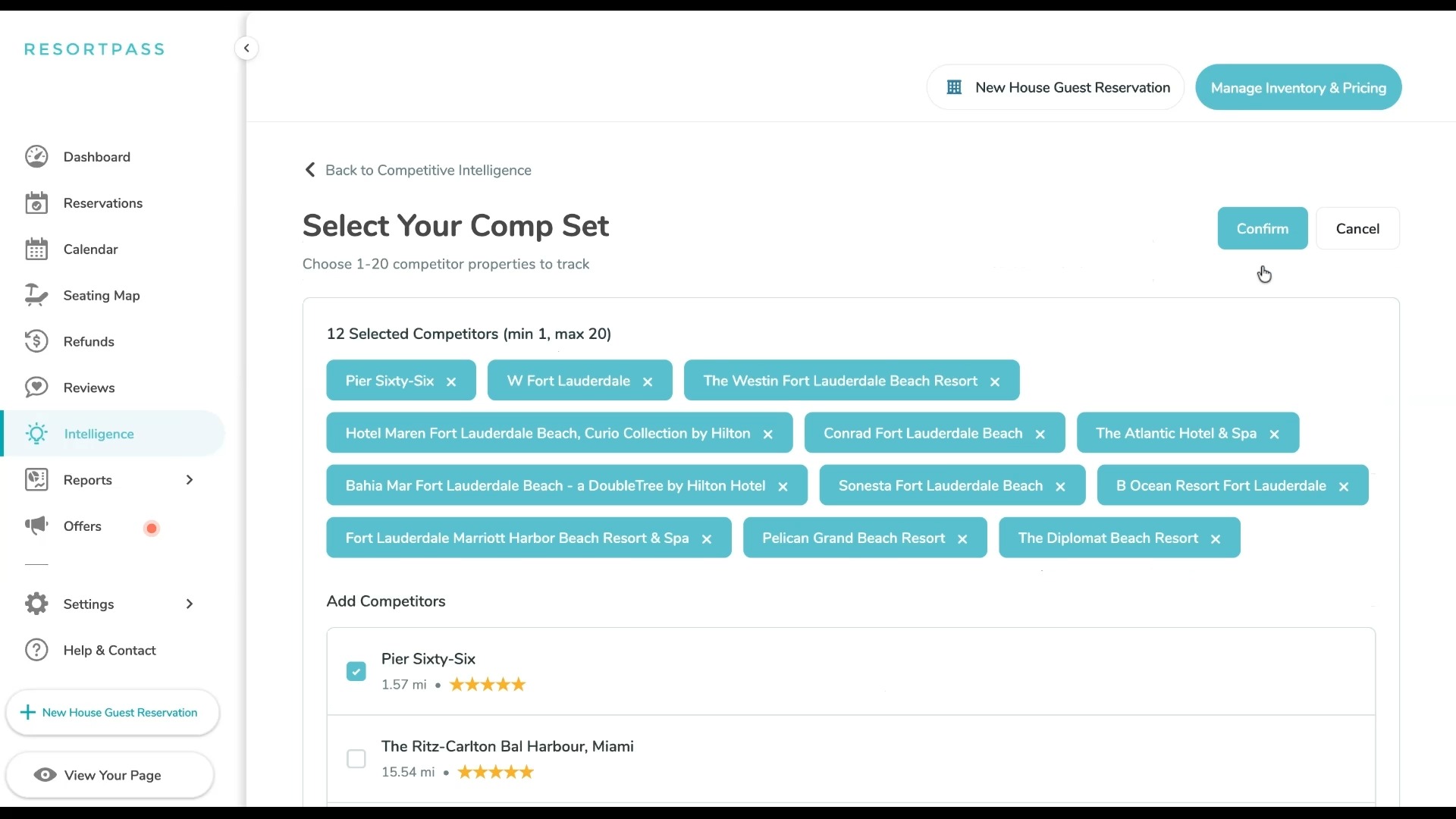
1) Set Your Comp Set
You can browse a list of hotels in your state that are on ResortPass, and select up to 20 properties that are your true competitors.
2) Review Your Competitive Intelligence Report
Once your comp set is saved, you're taken to your Competitive Intelligence report. Each row is one day in the month. For every day, you can see your utilization, your current price, and how that price compares to your comp set. That last column shows the low, average, and high price across the competitors you've selected. The bar gives you an instant visual read — if your price sits near the left edge, you're on the low end of the market. If it stretches further right, you're at or above average.
.jpg?width=1000&height=563&name=Competitive%20Intelligence%20Demo-0%20(1).jpg)
3) Adjust Pricing from Your Dashboard
In the example below, you can see clearly that weekday pricing is on the high end. Your pass is listed at $85 while the average price is $55, and only 13% of your passes have sold.
.png?width=1443&height=90&name=Competitive%20Intelligence%20Demo-1%20(1).png)
Here, your weekend passes are priced below average, presenting an opportunity to increase pricing.
%20(1).png?width=1443&height=90&name=Competitive%20Intelligence%20Demo-0%20(2)%20(1).png)
When you spot a date where your pricing needs to change, you don't have to go anywhere else to act on it. Click the edit icon next to any price and you can update your price or adjust your available capacity for that date.
%20(1).jpg?width=1443&height=90&name=Competitive%20Intelligence%20Demo-0%20(2)%20(1).jpg)
If you want to dig deeper or share the data with your team, the CSV export breaks out pricing for each individual competitor in your comp set — so you can see not just the range, but exactly what each property is charging on any given day for a given product.
4) Review Products Individually
%20(1).jpg?width=421&height=237&name=Competitive%20Intelligence%20Demo-0%20(1)%20(1).jpg) You can run this analysis for any product you offer. Use the dropdown in the top left to switch between your Day Passes, Spa Passes, and Cabanas. Each one compares you against the same product type across your comp set — Cabanas versus Cabanas, Day Passes versus Day Passes.
You can run this analysis for any product you offer. Use the dropdown in the top left to switch between your Day Passes, Spa Passes, and Cabanas. Each one compares you against the same product type across your comp set — Cabanas versus Cabanas, Day Passes versus Day Passes.
The more you use Competitive Intelligence, the sharper your pricing instincts get. You'll start to see patterns — which days your comp set spikes prices, which product types you're consistently under or over on, where you have room to push and where you need to pull back. That's the kind of visibility that turns pricing from guesswork into strategy.