
ResortPass integrates with Book4Time’s Booking API to allow your spa to list services on our marketplace without leaving the Book4Time system.
The integration works alongside your spa’s existing Book4Time setup and doesn't change how your current online booking or other integrations are configured.
Key Benefits of the Integration
- Less friction for Guests, which drives more bookings for you
- Guests can view real-time availability, select a technician gender preference, and book services on ResortPass without having to call the spa
- Cancellations sync in both directions. Whether a guest cancels directly via your spa or on ResortPass, the cancellation is automatically reflected in both places.
- Less manual work for spas, which means more time spent in front of guests
- Manage price and availability directly from Book4Time
- New reservations are posted directly in Book4Time. No manual entry needed.
- ResortPass reservations are tagged as a distinct source in Book4Time reporting, so they're never mixed up with your own website's bookings
Your Spa will need a Book4Time Booking API License
Confirm with your Book4Time Customer Success Manager if you already have a Booking API License as part of your contract. If not, you will need to request the license from them. Book4Time also offers a Data API - this will not integrate with our system.
Once you have a Booking API license and are ready to begin the integration, let your ResortPass Account Manager know. Our team will be available to you each step of the way to answer any questions and ensure a smooth integration!
3 Simple Steps to Integrate
Once you have a Book4Time Booking API license, it's very easy to turn on the integration! The person who manages your spa's Book4Time system will need to follow these steps.
Step 1: Create a new "ResortPass" user in Book4Time
Step 2: Share the following information securely with the ResortPass team so that we can access the API:
- Username and password for the new ResortPass user you created in Step 1
- Account token and API token. This will be provided to you by your Book4Time rep as part of your API license
Step 3: Set up a “webhook” in Book4Time
Admin > System settings > Global preferences > Webhook
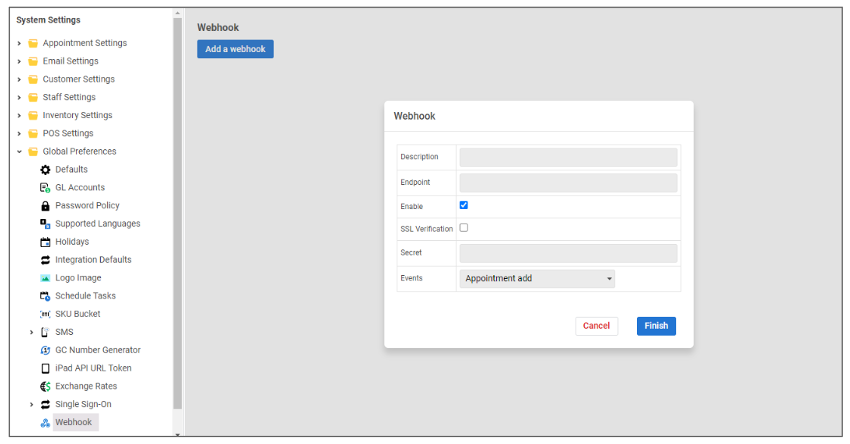
Enter the following information:
-
Description: “ResortPass appointment notifications"
-
Endpoint and Secret: The ResortPass team will give this to you via a secure link after you complete Step 2
-
Enable: ✅ Check this box
-
SSL verification: ✅ Check this box
-
Events: “Appointment add” and “Appointment update”
-
Note you will need to create two separate webhooks, one for each of these events
-
That completes the integration!
From here, your Account Manager will work with you to decide which products to list on the ResortPass platform, and what Book4Time products they should map to.